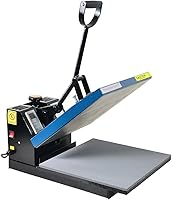
Heat Press Temperature and Time Guide
Use this heat press temperature guide to plan your project, then follow the transfer maker's temperature, time, pressure, and peel instructions for your fabric. Confirm the temperature unit and press setup, then check the result on a spare piece before making the finished item.
On this page (9 sections)
- What heat press temperature and time should you use?
- Why do settings change with the transfer and fabric?
- How should you prepare the press and garment?
- How can you check whether the platen heats evenly?
- How do you keep time and pressure consistent?
- Which cover sheet should you buy?
- What should you change when a transfer goes wrong?
- How should you care for the press and tools?
- Which heat press temperature guide setup should you choose?
A heat press temperature guide helps you choose settings, but your exact transfer and fabric determine the right temperature, time, pressure, and peel method. Start with the transfer maker's instructions, confirm the press unit, and check a spare piece before pressing the finished item.
A chart based only on fabric names leaves out too much. Two transfers made for cotton may need different settings, while a polyester garment may need a transfer designed for lower heat or dye control.
What heat press temperature and time should you use?
Use the instructions for your exact transfer, including any fabric restrictions. A generic temperature chart is a reference, not a complete pressing recipe.
Before heating the press, write down these details:
- Transfer brand and product type.
- Garment fiber content and any coating.
- Temperature and whether it's in Fahrenheit or Celsius.
- Main press time and pressure.
- Required cover material.
- Peel timing and any finishing press.
If instructions give a range, use their recommended starting point for your material. When no starting point is given, ask the supplier rather than choosing the hottest setting.
Keep pre-press, application, and finishing times separate. Adding them together into one long press can expose the garment and adhesive to more heat than intended.
How should you use a heat press temperature guide?
Use a heat press temperature guide to organize the instructions and record results. Keep a small job card for each transfer and garment combination so you can repeat a successful setup.
Record the press model, cover material, pressure adjustment, and peel method alongside temperature and time. If you change garment thickness or transfer type, check that combination again before starting a batch.
Why do settings change with the transfer and fabric?
The transfer sets the application requirements, while the fabric limits what heat it can tolerate. Heat transfer vinyl, direct-to-film transfers, and sublimation use different processes, so their instructions aren't interchangeable.
For vinyl, check the exact film type rather than using one setting for all HTV. Specialty finishes and layered designs may have different pressing steps.
For DTF, confirm both the peel method and any required finishing press. Our guide to choosing a heat press for DTF transfers explains which machine features support that workflow.
Sublimation also requires a suitable blank or coating. More heat won't make an unsuitable garment accept the process correctly.
Do cotton and polyester need different settings?
Match the transfer instructions to the garment's fiber content, including blends. Polyester can develop press marks or dye migration, while coatings and trims may introduce other heat limits.
Check the garment label before applying a design. If its care guidance conflicts with the transfer process, choose another garment or ask the supplier for a compatible option.
Seams, zippers, buttons, and thick hems can prevent even contact. Move them outside the pressing area where possible, and use a pressing pillow or pad only as directed.
How should you prepare the press and garment?
Set the press on a stable, heat-safe surface, clear the work area, and allow it to finish preheating. A displayed target temperature doesn't always mean the platen is ready for use.
Confirm Fahrenheit or Celsius before entering the setting. For conversions, °C equals (°F minus 32) multiplied by 5/9, and °F equals °C multiplied by 9/5 plus 32.
Lay the garment flat without stretching it, then check that the whole design fits within the usable pressing area. Avoid overlapping presses unless the transfer instructions allow them.
Our guide to how to use a heat press covers the pressing sequence. For model-specific setup, see how to use an HTVRONT heat press.
Pre-press only when the transfer instructions call for it. Use the specified pre-press duration rather than repeating the full application cycle.
How can you check whether the platen heats evenly?
Use the press maker's approved temperature-checking method and compare the center with several outer areas. Let the press stabilize first, and keep the measuring method consistent.
Infrared thermometers read surface temperature across an area, not just at the laser dot. Reflective metal can distort readings, and changing distance changes the size of the measured area.
Your press may need a suitable contact probe or temperature strips instead. Don't apply tape, coatings, or other materials to a hot platen unless the press maker approves that method.
Who should choose the Etekcity 774?
The Etekcity 774 suits occasional surface checks when infrared measurement is appropriate. It has adjustable emissivity, a backlit display, and a range of -58°F to 842°F.
Its 12:1 distance-to-spot ratio means the measured area grows as you move farther away. Etekcity recommends about 14.17 inches of distance, so follow its guidance and make sure the target fills the measuring area.
Skip it if your press requires contact measurement or you need to measure beneath a closed platen. Choose one thermometer for your workflow rather than buying several overlapping models.
How do you keep time and pressure consistent?
Follow the transfer's pressure guidance and reset pressure when garment thickness changes. A position that works for a thin shirt may behave differently with a sweatshirt or added pressing pad.
Check that the garment lies flat before closing the press. If the handle needs unusual force or the machine rocks, stop and adjust it according to the manual.
Start timing at the point specified for your machine and transfer. Open promptly, then follow the required hot, warm, or cold peel method.
Peeling early can lift a transfer that needs to cool. Waiting too long can also cause trouble with a transfer intended for a hot peel, so keep the instructions beside the press.
Which cover sheet should you buy?
Buy the cover material required by your transfer, rather than assuming any heat-resistant sheet will work. PTFE, parchment, and protective paper serve different roles and shouldn't be swapped without guidance.
The YRYM PTFE Teflon Sheets, 3 Pack suits crafters whose transfers allow a reusable nonstick cover. The sheets can be trimmed, and YRYM HT describes them as washable and tear resistant.
Skip these sheets when the process calls for disposable protective paper or another specific barrier. Heat resistance alone doesn't establish compatibility with your transfer.
Let sheets cool before cleaning, remove residue, and inspect them before reuse. Replace damaged sheets and keep any sheet carrying ink or adhesive residue away from clean garments.
What should you change when a transfer goes wrong?
Check the failure pattern before changing heat, then adjust one variable at a time on spare material. A lifting edge, a full design that won't adhere, and a scorch mark point to different problems.
| Problem | Check first |
|---|---|
| One edge lifts | Uneven contact, seams, placement, and peel timing |
| Whole design lifts | Correct transfer instructions, heat readiness, pressure, and peel method |
| Fabric looks shiny or scorched | Fabric compatibility and total heat exposure |
| Design shifts or doubles | Movement during closing, opening, or carrier removal |
| Color appears later through the design | Dye migration and transfer compatibility |
Don't keep adding heat to a damaged garment. Correct the setup and use another spare piece to judge the change.
Who should choose the other infrared thermometers?
Choose the Etekcity Laser Infrared Thermometer for broader temperature tasks beyond the press. Its Lasergrip 1080 model measures -58°F to 1130°F and has adjustable emissivity and a maximum-temperature display.
Skip this option if its wider range is your only reason to replace a suitable thermometer. A higher temperature ceiling doesn't establish better accuracy at your pressing temperature.
Choose the TempPro Infrared Thermometer for scan summaries. Its maximum, minimum, and average displays help you review the last scan, and it has adjustable emissivity.
Skip the TempPro if you only need individual readings and already have a suitable tool. For useful comparisons, scan comparable areas at a consistent distance and record individual locations as well as summaries.
How should you care for the press and tools?
Turn off the press and let it cool before cleaning or storing accessories. Follow its manual for platen cleaning so you don't damage the surface with an unsuitable cleaner or abrasive.
Keep thermometer lenses clean according to their instructions and store the tools away from the hot platen. Check battery condition before investigating readings that seem inconsistent.
Keep hands, cords, and loose materials clear during use, and don't leave a heated press unattended. Follow the material supplier's ventilation guidance and stop if the garment scorches or the machine behaves unexpectedly.
Which heat press temperature guide setup should you choose?
Build your heat press temperature guide around repeatable job instructions, then buy accessories for a specific need. For a wider view of press styles and uses, see our heat press machine guide.
Choose the YRYM sheets when your process permits reusable PTFE protection. Choose the Etekcity 774 for occasional suitable surface checks, the Etekcity 1080 for broader temperature work, or the TempPro for scan summaries.
If your press requires another measuring method, buy that tool instead. Resolve uneven contact and material compatibility before changing temperature or adding accessories.
For a new machine, start with how to choose a heat press. Check what size heat press you need so your usual design fits the usable platen area in one press.
Frequently asked questions
What temperature should I set my heat press to?
Use the temperature specified for your exact transfer and fabric, rather than a general setting for cotton or polyester. Confirm Fahrenheit or Celsius, allow the press to finish preheating, and check a spare piece using the full instructions before pressing a finished garment.
How long should I press a heat transfer?
Use the transfer maker's stated duration, keeping any pre-press and finishing press separate from the main application time. Start the timer as directed for your machine, follow the required peel timing, and avoid extending the press to compensate for uncertain heat or uneven contact.
How do I check heat press platen temperature?
Use the checking method recommended by the press maker, which may require a suitable contact probe or temperature strips. If infrared measurement is allowed, follow the thermometer's distance and emissivity instructions and compare several areas, since reflective surfaces can distort readings and one measurement can miss uneven heat.
Can I use one heat press setting for every fabric?
No, one setting won't suit every fabric because fiber content, coatings, garment construction, and transfer requirements all affect the process. Match the transfer instructions to the garment label, check a spare piece first, and ask the transfer supplier for guidance if the material isn't covered.