How to Choose a Heat Press
Decide what heat press to buy by matching your largest regular transfer, pressure needs and workspace. Choose a handheld press for occasional crafts, a manual flat press for lever-operated pressing, or an automatic model for repeated press cycles.
On this page (10 sections)
- What heat press should you buy for your projects?
- How large should the heat press platen be?
- Should you choose a handheld, manual or automatic press?
- Which heat press features matter most?
- Which heat press fits each kind of buyer?
- Do you need separate heat presses for mugs and hats?
- What should you measure before buying a heat press?
- How should you set up and care for a heat press?
- Which buying and pressing mistakes should you avoid?
- How do you decide what heat press to buy?
Decide what heat press to buy by matching your regular transfer size, pressure needs and workspace. Choose a handheld model for occasional crafts, a manual flat press for lever-operated pressing, or an automatic machine for repeated cycles.
Start with the projects you'll actually make: small shirt logos, broad front designs, thick sweatshirts or shaped blanks. Those jobs place different demands on the press.
Our overview of heat press machine types and sizes explains the main formats. Here, the focus is choosing the right format and avoiding features you won't use.
What heat press should you buy for your projects?
Buy a press that covers your usual artwork in one placement and meets the transfer's heat and pressure instructions. Choose for your regular work rather than a rare project you might try later.
| Your main use | Press style to consider | Main buying check |
|---|---|---|
| Occasional shirts, bags and home crafts | Portable handheld press | Can you apply steady pressure on a firm surface? |
| Large shirt graphics | Larger flat platen | Does the whole transfer fit within the heated area? |
| Repeated garment projects | Automatic or fixed manual press | Does its cycle suit your pace and pressure needs? |
| Thick sweatshirts | Press with suitable clearance | Can you position the garment without bulky seams interfering? |
| Mug wraps or hat crowns | Equipment shaped for the blank | Does it fit the blank and transfer method? |
Think through a typical batch before choosing: loading, alignment, pressing, peeling and unloading. An automatic cycle helps with pressing, but garment preparation and transfer placement still take time.
For a first machine, narrow your plans to 1 or 2 repeatable projects. Our heat presses for beginners guide helps compare options once you know the size and pressing style you need.
How large should the heat press platen be?
Choose a platen that covers the largest transfer you expect to use regularly, with room to position it correctly. Buying extra heat area won't solve poor contact around seams, collars or pockets.
Measure the artwork's width and height, including separate pieces that must press together. A small logo on a large shirt needs less heat area than a broad graphic on a smaller garment.
A 12 x 10 in surface handles designs within those dimensions; a 15 x 15 in platen gives more room for broader graphics. Neither size automatically suits every adult shirt design.
Don't plan on overlapping presses as your default solution for oversized artwork. Multiple placements can expose parts of a transfer to extra heat, so use that method only when the transfer instructions allow it.
Our heat press size guide explains how to match artwork, garments and available space.
What size heat press should you buy for shirts?
For shirts, buy enough platen area for your actual designs, then check garment placement. Seams and collars can hold the heated surface away from the transfer even when the artwork fits.
For example, a 9 x 8 in graphic fits within either surface size above. A 13 x 11 in graphic needs more coverage than either handheld option here provides in one placement.
Lay out several planned designs at full size before ordering. This makes a better size check than judging artwork on a phone screen.
Should you choose a handheld, manual or automatic press?
Choose a handheld press for movable setup, a manual machine for lever-operated pressing, or an automatic model to reduce repeated opening and closing. All 3 still need correct placement and suitable settings.
Handheld presses rely on you to apply pressure throughout the cycle. They suit occasional projects and shared craft spaces, provided you have a firm pressing surface and a safe place for the hot press.
A fixed manual press gives you a supported lower work area and a handle or lever for closing. This suits buyers who want to adjust pressure and repeat a familiar pressing motion.
An automatic press performs its cycle after setup. It can reduce manual handling during repeated work, but it doesn't choose the correct recipe or align the design for you.
Is an automatic heat press worth buying?
An automatic press is worth considering when repeated press cycles are part of your routine. For a few occasional projects, storage and setup may matter more than automatic release.
Compare pressure adjustment and garment clearance before choosing on automation alone. Those features determine whether the machine suits your materials, especially when switching between thin shirts and thicker garments.
Our clamshell, swing-away and automatic press guide explains the opening mechanisms and the workspace each style needs.
Which heat press features matter most?
Prioritize coverage, pressure control and suitable heat settings before convenience features. The press must meet all parts of the transfer instructions, not just reach the required temperature.
- Temperature controls: Choose a machine whose confirmed operating range includes your intended materials.
- Time controls: Look for settings you can read and repeat without guessing.
- Pressure method: Decide whether you'll apply pressure by hand or adjust it through the machine.
- Garment clearance: Check thick items and how you'll position seams, pockets and drawstrings.
- Operating space: Allow room for loading, opening and safely setting down hot items.
- Support: Read warranty terms and keep the instructions and proof of purchase.
A pressure display can help you repeat your own process, but its number doesn't automatically translate into every transfer supplier's pressure guidance. Follow the press instructions for interpreting and adjusting it.
For DTF projects, give pressure requirements particular attention. Our guide to choosing a heat press for DTF transfers explains why temperature alone isn't enough.
Use the transfer supplier's recipe for time, heat, pressure and peeling. Our heat press temperature and time guide explains how these settings work together.
Which heat press fits each kind of buyer?
Choose the Cricut for guided craft use, HTVRONT Auto 2 for automatic cycles, HTVRONT's handheld for pressure feedback, or Fancierstudio for manual flat pressing. Each solves a different workflow need.
The 4 options below suit flat projects. Match their strengths to your work rather than treating them as interchangeable shirt presses.
Cricut EasyPress SE 12x10: for occasional crafts and guided settings
The Cricut EasyPress SE suits occasional apparel and home craft projects where you want to move the press between work and storage. The Cricut Heat Guide provides time, temperature and pressing instructions.
Its ceramic-coated plate reaches adjustable temperatures up to 400°F (205°C). It works with major brands of iron-on, Infusible Ink and sublimation products, provided the blank and transfer are compatible.
Choose it for shirts, pillows, blankets and similar projects when you prefer a handheld tool over a fixed machine. Guided settings are useful if you want a clear starting process for supported material combinations.
Skip it for routine oversized graphics or if holding pressure during every cycle would be uncomfortable. It also won't replace a shaped press for wrapping a mug or pressing a hat crown.
Plan for a firm, heat-safe work area before buying. Portability helps with storage, but it doesn't remove the need for a proper pressing surface.
HTVRONT Auto Heat Press 2 15x15: for repeated garment work
The HTVRONT Auto Heat Press 2 suits buyers making repeated shirt or sweatshirt projects who want automatic pressing and release. Set the parameters and press “R” to begin the cycle.
Pressure is adjustable up to 170 lb. That adjustment makes this model worth considering when your work includes transfers with specific pressure needs.
The machine measures 20.9 x 17.1 x 13 in and weighs 21.54 kg. Treat it as a machine for a stable, dedicated work area rather than something you'll casually move between rooms.
Its adjustable screen helps position the controls for viewing, and auto-off activates after 15 minutes without operation. Stay nearby throughout use, including during automatic cycles.
Skip it if storage and frequent moving are your priorities or your artwork regularly exceeds its platen. Automatic release also won't fix a folded garment or a seam trapped beneath the design.
HTVRONT 12x10 Pressure Display Press: for handheld pressure feedback
The HTVRONT Pressure Display Press suits crafters who want handheld operation with visible pressure information. Its screen shows pressure, time and temperature, while dual handles provide 2 gripping points.
Choose it if you want help keeping your hand-applied pressure consistent across similar projects. The display gives feedback while you work; you still supply the force.
It includes an insulated safety base, an end-of-cycle sound and auto shutoff after 15 minutes of inactivity. Use the base as directed whenever you need to put down the hot press.
Skip it if you want the machine to maintain pressure for you or you regularly make broad shirt graphics. At 4.35 kg, it's also worth considering how comfortable repeated lifting will be.
Confirm the maximum operating temperature with HTVRONT before choosing it for high-heat work. The stated 212°F first-minute warm-up figure doesn't establish its maximum setting.
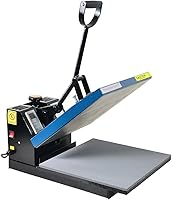
Fancierstudio Digital Heat Press 15x15: for manual garment pressing
The Fancierstudio Digital Heat Press suits buyers who want a fixed manual press with electronic time and heat controls. Adjustable pressure lets you set up the machine around the garment and transfer.
Its upward-opening design keeps the upper platen above the work area when open. Check that you can position garments comfortably without reaching against the heated surface.
Choose it when you prefer closing and opening a manual machine rather than holding a portable press down. Its coated heat platen and silicon-gel base board are features to maintain according to Fancierstudio's instructions.
Allow for its 33 x 23 x 20 in outside dimensions and confirm adequate opening clearance. Fancierstudio provides a 3-month warranty.
Skip it if you need frequent storage or automatic release. Confirm the operating temperature range before buying for demanding heat requirements because Fancierstudio's supplied temperature figures conflict.
Do you need separate heat presses for mugs and hats?
Use equipment shaped for the blank when your projects involve mug wraps or hat crowns. A broad flat platen can't maintain even contact around those curves.
Don't assume a flat press accepts attachments just because another machine looks similar. Confirm attachment compatibility and blank dimensions before building your setup around add-ons.
For hats, crown shape and seam placement affect contact. Our guide to heat pressing a hat explains positioning and preparation.
For mugs, the blank must suit the transfer process as well as the machine. Read how to use the Cricut Mug Press before deciding whether mug work needs its own setup.
What should you measure before buying a heat press?
Measure the full operating area, including space to open the press, load garments and handle hot items. Platen dimensions describe the heated surface, not the room the machine needs.
- Measure the workbench and confirm it can support the machine.
- Check outside dimensions and required opening clearance.
- Leave a clear area for aligning transfers before pressing.
- Plan where hot items will rest without touching other materials.
- Confirm the outlet and circuit suit the machine's electrical requirements.
- Measure the storage route if the machine won't stay in place.
Keep fabric, packaging and loose cords away from the heated area. Follow the manufacturer's electrical instructions rather than assuming an extension cord or power strip is suitable.
Also account for supplies required by your transfer process. Protective sheets, a suitable pressing mat and alignment tools can matter more than an extra machine feature.
How should you set up and care for a heat press?
Set the press on a stable, heat-safe surface and follow its manual before the first project. Keep enough room around it to work without reaching across a hot platen.
Prepare a clean blank and check for lint, moisture and wrinkles as directed for your transfer method. Pre-press only when the material instructions call for it.
Position the artwork with bulky seams outside the pressing area where possible. Use suitable support or pressing accessories only as allowed by the machine and transfer instructions.
Let the machine reach the required setting before starting. For an unfamiliar blank and transfer combination, make a sample before committing a whole batch.
Follow the specified hot, warm or cold peel directions. Peeling early or late can spoil a transfer even when the pressing settings were correct.
After use, switch off and unplug the machine as directed, then let it cool before storage. Clean the plate and base using the manufacturer's method, avoiding abrasive tools that could damage coatings.
For the full sequence, read how to use a heat press.
Which buying and pressing mistakes should you avoid?
Avoid buying by maximum temperature or platen size alone. A useful press must also provide suitable pressure, garment access and a workable daily setup.
Don't assume more pressure or heat improves every transfer. Excess can mark fabric or damage a design, so change settings only within the supplier's guidance.
Don't choose a portable model solely because you have a small room. You still need a suitable surface, hot-press resting space and room to position the entire garment.
Don't repeat a failed press cycle without checking the likely cause. Review contact, alignment, pressure and peel timing before adding more heat.
Keep a short project record with the blank, transfer, settings and peel method. This helps repeat successful combinations without guessing at the next session.
How do you decide what heat press to buy?
Decide what heat press to buy by choosing the machine that handles your regular work with the fewest awkward steps. Use artwork size first, then pressure method, garment fit and workspace to narrow the choice.
Pick the Cricut EasyPress SE for guided craft projects. Choose the HTVRONT Pressure Display Press if you want handheld operation with pressure feedback and can comfortably handle it.
Choose the HTVRONT Auto Heat Press 2 for repeated automatic cycles and adjustable pressure. Pick the Fancierstudio if you prefer a fixed manual press and its size and warranty suit your plans.
Before ordering, map out one complete project from alignment to cooling. Then compare heat press machines by type and size to confirm that your chosen format fits the way you'll work.
Frequently asked questions
What heat press should a beginner buy?
A beginner should buy a press that covers their usual transfer and provides the heat and pressure their materials require. Choose a handheld model for occasional projects and easier storage, or a fixed press if you prefer a supported work area and repeated garment work.
Is a 12x10 heat press big enough for shirts?
A 12 x 10 in press is big enough for shirt transfers that fit within its heat area, including many chest designs. Measure the artwork rather than the shirt, and choose a larger platen if your regular designs need more coverage or their instructions require one complete press.
Should I buy an automatic heat press?
Buy an automatic heat press if repeated press cycles and less manual opening and closing would help your routine. You still need to position garments, choose suitable settings and supervise the machine, so compare its pressure controls, clearance and workspace needs before choosing it over a manual model.
Do I need a separate press for mugs or hats?
You generally need equipment shaped for mugs or hat crowns because a flat platen cannot maintain contact around those curves. Choose a dedicated machine or a compatible attachment for your intended blank, and confirm that the transfer method works with its material, coating and shape before buying.
What should I check before buying a heat press?
Check transfer size, temperature requirements, pressure control, garment clearance and the room needed to operate the press. Measure your workbench and storage area, confirm the electrical requirements, and budget for a suitable pressing surface and any protective materials required by the press and transfer instructions.