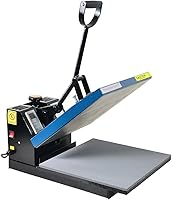
Fancierstudio Heat Press Review: Worth It? (October 2026)
The Fancierstudio heat press suits shirt makers who want electronic time and heat settings with manual pressure control. Choose an HTVRONT alternative if automatic pressing and release better fit your workflow.
On this page (10 sections)
- Who should buy the Fancierstudio heat press?
- How does Fancierstudio compare with the HTVRONT alternatives?
- Will your designs fit the pressing area?
- How much workspace does the Fancierstudio need?
- How should you set up the press before your first project?
- Which temperature and time settings should you use?
- How do you set pressure without damaging the project?
- What pressing mistakes should you avoid?
- How should you clean and care for the press?
- Which press should you choose for your next projects?
The Fancierstudio heat press is a sensible choice for shirt makers who want manual pressure control and electronic time and heat settings. Choose it if you want to manage each pressing cycle yourself; choose an automatic alternative if repeated opening and closing would slow your work.
Its appeal is control over a straightforward flat-project workflow. The buying decision comes down to your designs, workspace and willingness to adjust pressure, rather than the number of materials you hope to decorate.
Who should buy the Fancierstudio heat press?
The Fancierstudio suits makers who want to set pressure themselves for shirts and other flat crafts. It's less suited to anyone whose main goal is removing manual steps from a run of similar projects.
Fancierstudio Digital Heat Press 15x15

- 15 x 15 in press area
- Electronic time and heat control
- Adjustable pressure
- 110 volts; 1800 watts
Choose this upward-opening press when you want to adjust pressure yourself for flat craft projects. Allow room above the machine and plan to manage each pressing cycle.
Pros
- Manual pressure adjustment
- Electronic time and heat controls
- 15 x 15 in heat press sheet included
- Teflon-coated heat platen
Cons
- Needs overhead opening clearance
- Pressure requires manual adjustment
- Conflicting maximum temperature figures need clarification
The electronic timer runs from 0 to 999 seconds, and the package includes a heat press sheet. A Teflon-coated upper platen and glued-down silicon rubber base are also part of the design.
Those features support flat transfer work, but the transfer and blank still determine what you can make. A shirt, mouse mat and coated ceramic tile need different preparation, even when they fit under the same press.
When does the Fancierstudio heat press make sense?
Choose it when manual pressure adjustment is a priority and you're comfortable recording settings for different projects. That control is useful when your transfer instructions call for a pressure level that you want to adjust yourself.
Skip it if you'd rather load a project and let the machine handle pressing and release. Also skip a flat press as your main tool if most of your work involves curved items such as hats or tumblers.
How does Fancierstudio compare with the HTVRONT alternatives?
The main difference is manual pressure control versus an automatic pressing cycle. All 3 presses have a 15 x 15 in working area, so none gives you more room for a large design.
| Press | Pressure control | Loading style | Best reason to choose it |
|---|---|---|---|
| Fancierstudio Digital Heat Press 15x15 | Manual adjustment | Upward-opening | You want to manage pressure and each cycle |
| HTVRONT 15x15 Heat Press | Automatic adjustment | Drawer-style | You want fewer manual steps for repeat projects |
| HTVRONT Auto Heat Press 15x15 | Automatic adjustment | Drawer-style | You want preset and custom modes at a shared station |
Both HTVRONT models press and release automatically, accommodate projects up to 1 in thick, and provide 4 fast modes, 2 custom modes and an automatic mode. Each shuts off after 15 minutes without operation.
These shared functions don't establish a difference in finished transfer quality. Your transfer instructions, garment placement and material choice still matter with either machine.
Who should choose the pink HTVRONT 15x15?
The pink HTVRONT suits repeat shirt batches where you want fewer manual actions between loading and unloading. HTVRONT provides a 1-year warranty for this model, which gives it a clear point of difference from the white alternative.
Skip it if your work depends on choosing pressure manually. Its maximum temperature is 410°F, so confirm that your planned materials fit within that limit before buying.
Who should choose the white HTVRONT Auto Heat Press?
The white HTVRONT suits a shared craft station where users return to familiar projects and can save custom settings. Each person should still check the selected settings before starting, especially after someone else has used the machine.
HTVRONT provides a 30-day warranty for this model, so compare those terms carefully with the pink version. Its shared automation features alone don't make it a better choice for every buyer.
The HTVRONT Auto Heat Press 2 review covers another automatic option. For the broader differences in loading and operation, read our guide to clamshell, swing-away and auto heat presses.
Will your designs fit the pressing area?
Choose a platen that holds your whole design in one press whenever possible. Measure the transfer itself, rather than using the shirt's overall size as your guide.
A small chest logo and a wide adult-shirt graphic have different space needs. Check your largest planned design, including any text or decorative border, before settling on a machine.
Oversized artwork that needs several placements is harder to align. Overlapping heat cycles can also expose part of a transfer to more heat than its instructions allow.
Seams, zippers and pockets create another limit: they can stop the design area from lying flat. A pressing pillow or pad can help with some garment shapes, but use accessories that suit the press and transfer method.
Our heat press size guide explains how to match the platen to your projects. You can also browse the T-shirt press guide when planning a shirt-focused workspace.
How much workspace does the Fancierstudio need?
Plan for the machine, its open position and a separate area for arranging transfers. The Fancierstudio measures 33 in long, 23 in wide and 20 in high, but closed dimensions don't show all the clearance needed during use.
Its upward-opening design needs room above the press. Check nearby shelves, cabinets and lights, then make sure you can reach the handle without leaning over the heated area.
The HTVRONT drawers need clear space in front instead. Avoid placing a press at a table edge where loading a shirt would leave the fabric dragging or the work surface crowded.
Use a stable, level, heat-tolerant bench with enough support for the machine. Keep cords, packaging and loose craft supplies away from the hot area, and leave a safe place for finished items to cool.
How should you set up the press before your first project?
Start with a suitable work surface and power connection, then follow the machine's assembly and operating instructions. The Fancierstudio uses 110 volts and draws 1800 watts, so check that your supply and circuit suit those requirements.
Avoid sharing a heavily loaded circuit with other high-draw appliances. Follow the manual's cord guidance rather than assuming a household extension cord or power strip is suitable.
Before switching on, check the base and platen for packing material or debris. Identify the controls, timer behavior and opening procedure while the machine is cool.
Prepare the blank and transfer beside the press so you won't need to search for tools during a cycle. Keep the transfer instructions nearby, including the pressure guidance and peel method.
For a complete loading sequence, see how to use a heat press. A written checklist helps you repeat the same steps when moving between different projects.
Which temperature and time settings should you use?
Use the transfer supplier's settings for the exact blank and material. A machine's maximum temperature is a capability limit, not a recommended pressing temperature.
Fancierstudio gives conflicting upper limits of 699°F and 500°F. Confirm the operating limit with the brand before buying for work that depends on high temperatures.
Allow the press to reach the required setting before starting. If the manual calls for additional warm-up time, include that in your routine rather than rushing the first transfer.
For a new combination of transfer and fabric, make a sample on a spare compatible blank before starting a batch. Inspect the result after the required peel and cooling steps, then record the settings that produced an acceptable result.
Don't add time or heat simply because a transfer hasn't adhered. Wrong pressure, unsuitable fabric or an incorrect peel method can cause similar problems.
The heat press temperature and time guide explains why settings vary between transfer methods. Check those differences before switching from one type of decoration to another.
How do you set pressure without damaging the project?
Follow the transfer's pressure guidance and the press manual's adjustment method. More pressure isn't always better, and a setting that suits a thin shirt may not suit a thicker item.
Make adjustments only as the manual directs, and avoid forcing the handle closed. Keep fingers away from the closing area while checking how the press operates.
Arrange the garment so thick seams and fasteners don't lift the transfer area away from the lower surface. The goal is supported, even contact across the design.
Keep a simple project log with the blank, transfer type, time, temperature and pressure setting. It gives you a useful starting point when repeating the same project, though you should recheck after changing materials.
What pressing mistakes should you avoid?
The most costly mistakes are using the wrong settings, loading uneven fabric and peeling at the wrong time. Automation doesn't correct any of those choices.
Pressing over folds or bulky seams
Smooth the garment before positioning the transfer and check underneath for folds. Move seams outside the pressing area where possible so they don't interfere with contact.
Pre-press only as the material and transfer instructions direct. It can help remove moisture or wrinkles in some workflows, but extra heat isn't suitable for every blank.
Moving the transfer while closing the press
Align the artwork before starting and keep loose fabric supported. If the method calls for heat-resistant tape, use the appropriate type rather than household adhesive tape.
Guessing when to remove the carrier
Follow the specified hot, warm or cold peel method. Removing the carrier too soon or waiting too long can affect the result, depending on the transfer.
Repressing without checking the instructions
Don't respond to every lifting edge with a longer second cycle. Check the cause first, then follow the supplier's guidance on cover sheets and any additional press.
Treating automatic release as permission to leave
Stay nearby while any press is operating and keep children and pets away. Automatic release ends a pressing cycle, but the machine and project can remain hot.
How should you clean and care for the press?
Keep the pressing surfaces clean and free of adhesive residue so debris doesn't mark the next project. Switch off, unplug and let the machine cool before cleaning or maintenance, unless its manual gives a specific alternative procedure.
Follow the manufacturer's cleaning directions for the coated platen and lower pad. Avoid abrasive tools that could damage the coating, and don't apply an unfamiliar cleaner to a hot surface.
Use the protective sheet required by the transfer process. A coated platen doesn't replace transfer-specific protection against adhesive, ink or other residue.
Before each session, look for a damaged cord, loose parts or an uneven pressing surface. Stop using the machine if something is damaged, and follow the brand's service instructions.
Which press should you choose for your next projects?
Choose the Fancierstudio heat press if your priority is manual pressure control and you're willing to manage each cycle. Before ordering, confirm its temperature limit, measure the opening clearance and make sure your usual designs fit.
Choose the pink HTVRONT if automatic operation suits repeat batches and its longer stated warranty matters to you. Choose the white HTVRONT if its preset and custom workflow fits your craft station, after weighing its shorter warranty.
If large shirt graphics are your main project, decide the required platen size before choosing between manual and automatic operation. Compare the best heat presses for T-shirts with your largest planned transfer in mind.
Frequently asked questions
Is the Fancierstudio 15x15 heat press automatic?
The Fancierstudio uses electronic time and heat controls with manually adjustable pressure, so choose it for a manual workflow. If you need automatic pressing and release, both HTVRONT alternatives here provide those functions, along with pressure adjustment for projects up to 1 in thick.
What can the Fancierstudio heat press handle?
The Fancierstudio suits flat projects such as shirts, bags and mouse mats, provided the transfer and blank are compatible with heat pressing. Fancierstudio also describes uses with puzzles and ceramic tiles, but each blank still needs the correct coating, settings and support for its transfer method.
Does the Fancierstudio press have a timer?
Yes, the Fancierstudio has an electronic timer with a range of 0 to 999 seconds, plus electronic heat control. Set the timer to the transfer supplier's instructions for your fabric or blank, and check whether those instructions also call for pre-pressing, a second press or a specific peel method.
Should I choose Fancierstudio or an HTVRONT auto press?
Choose Fancierstudio if you want to adjust pressure yourself and prefer a manual pressing routine for flat projects. Choose an HTVRONT alternative if automatic pressing and release would reduce repetitive steps, then compare the exact model's warranty, required loading space and temperature limit before ordering.