HTVRONT Auto Heat Press 2 (15x15) Review: Worth It?, October 2026
The HTVRONT Auto Heat Press 2 suits DTF crafters and hoodie projects that need adjustable pressure and extra pressing height. Choose an earlier automatic model for routine flat work, or a larger platen for oversized designs.
On this page (9 sections)
- The HTVRONT Auto Heat Press 2 at a glance
- How much does adjustable pressure matter for DTF?
- Is the pressing area large enough for your designs?
- What should you expect from heating and controls?
- How should you set it up for the first project?
- Which earlier HTVRONT model should you consider?
- When is the larger Delclynee the better choice?
- What mistakes should you avoid, and how should you care for it?
- Should you buy the HTVRONT Auto Heat Press 2?
The HTVRONT Auto Heat Press 2 is a strong choice for DTF crafters and bulky garment projects because it combines adjustable pressure with automatic pressing and release. Choose it when control over the pressing setup matters more than having the fewest settings.
Its extra clearance helps with loading thicker items, but it doesn't increase design size. If oversized artwork is your main need, a larger platen is the more useful change.
The HTVRONT Auto Heat Press 2 at a glance
The Auto Heat Press 2's main benefit is user-controlled pressure in an automatic press. It suits crafters moving between materials with different application requirements.
HTVRONT Auto Heat Press 2 15x15
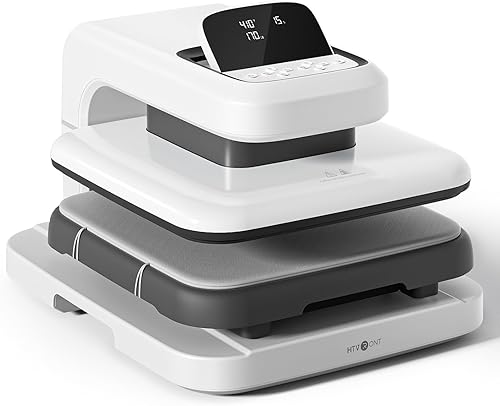
- 15 x 15 in platen
- Adjustable pressure up to 170 lb
- Presses items up to 1.77 in high
- Automatic press and release
Choose this model for DTF work that calls for pressure adjustment or bulky garments that need more loading room. Automatic pressing and release handle the cycle after you set the controls.
Pros
- User-adjustable pressure
- Extra clearance for bulky garments
- Automatic pressing and release
- Screen adjusts across 7 positions
Cons
- Pressure needs to match the transfer instructions
- Fixed platen size limits oversized designs
Pressure adjusts up to 170 lb, and the pressing height accommodates items up to 1.77 in high. HTVRONT identifies DTF transfers and heavier garments such as hoodies as uses for those features.
Once you set the parameters and press R, the machine presses automatically, sounds a buzzer when the timer ends and releases the material. You still handle placement, material selection and the correct peel method.
Who should buy the HTVRONT Auto Heat Press 2?
Buy it if your transfer instructions call for pressure control or your projects include bulky garments. The combination makes more sense for varied work than for someone repeating one simple shirt design.
Skip it if your main problem is artwork that won't fit under the platen. Also consider an earlier automatic model if routine shirts and totes cover your needs and you prefer automatic thickness adjustment.
For an existing HTVRONT owner, identify the limit you're trying to remove before upgrading. More clearance helps with thickness, while adjustable pressure addresses application requirements; neither solves a shortage of pressing area.
How much does adjustable pressure matter for DTF?
Pressure control matters when your transfers require a setting you need to choose and repeat. HTVRONT describes the Auto Heat Press 2's adjustable pressure as suitable for DTF work.
Start with the transfer supplier's instructions rather than the press's maximum capability. More pressure isn't automatically better, and heat, dwell time, garment compatibility and peeling all affect the result.
Keep a short job record for each transfer and fabric combination. Record the temperature, time, pressure setting and peel instructions so you can return to a successful setup without guessing.
Check a sample through the full application process before making a batch. An automatic cycle repeats your settings, including any setting that was wrong at the start.
If you're choosing equipment around DTF rather than general crafting, read our guide to choosing a heat press for DTF transfers. It helps you match the press to the transfer process you plan to use.
Is the pressing area large enough for your designs?
A 15 x 15 in platen suits designs that fit fully within that working area. Measure your largest planned transfer, including its placement on the garment, before choosing the machine.
A shirt's size doesn't tell you the size of press it needs. A small chest logo and a full-front design on the same shirt can have very different space requirements.
Avoid buying around the idea of pressing one large transfer in overlapping sections. Reheating part of a design can cause problems with some materials, so a full-area press is the better starting point for oversized work.
Garment shape also matters because collars, pockets, zippers and seams can keep the decorated area from lying flat. Extra loading height doesn't remove those raised areas or guarantee even contact around them.
Lay out a representative garment and measure the clear, flat area around your artwork. Our guide to what size heat press you need explains how to turn those measurements into a machine choice.
What should you expect from heating and controls?
The Auto Heat Press 2 handles the press cycle after setup, while you choose the application settings. Its manually adjustable screen has 7 positions across a 0 to 75 degree range.
HTVRONT says the machine reaches 410°F in 5 minutes and 30 seconds. The brand attributes its even heating to a dual-tube heating engine and NTC thermistor technology.
That warm-up claim describes reaching a temperature, not a recommended setting for your project. Use the required application temperature even when it's well below the machine's maximum.
The press uses 120 volts and 1,500 watts, so plan its outlet and placement according to the manual. Its 15-minute idle shutoff is useful, but you should remain nearby during operation.
Automatic release ends the pressing cycle; it doesn't make the garment ready to peel. Some transfers need a hot peel, while others require cooling, and that instruction comes from the transfer supplier.
Use our heat press temperature and time guide to understand the differences between processes. The instructions supplied with your transfer take priority over a general chart.
How should you set it up for the first project?
Set up the workspace and confirm material compatibility before heating the press. A stable bench and room to handle garments matter as much as fitting the machine itself.
The Auto Heat Press 2 measures 20.9 in long, 17.1 in wide and 13 in high, and weighs 21.54 kg. Choose a surface that supports it and leaves the operating clearances required by HTVRONT.
Allow space for loose fabric, transfer sheets and a cooling area. Keep cables and garment tails away from hot surfaces, and place frequently used tools within reach without reaching across the platen.
For the first project, use this order:
- Confirm that the transfer process suits the garment or blank.
- Read the transfer's temperature, time, pressure and peel instructions.
- Arrange the garment so the decorated area lies flat.
- Set the controls and wait for the required temperature.
- Position the transfer and use any protective sheet its instructions require.
- Run the cycle, peel at the correct stage and inspect the result.
Use a lint roller when the application instructions call for a clean, lint-free surface. Pre-press only as directed for the fabric and transfer, rather than adding an extra heating step to every job.
Our guide to using an HTVRONT heat press provides a broader workflow. Keep the manual for your exact model nearby for its controls and operating directions.
Which earlier HTVRONT model should you consider?
The earlier HTVRONT models suit routine flat work when automatic thickness adjustment covers your needs. They share several core features, so choose by the exact controls, warranty and project limits that matter to you.
| Model | Best reason to choose it | Reason to skip it |
|---|---|---|
| Auto Heat Press 2 | Control over pressure for varied materials | Your artwork needs a larger platen |
| Auto Heat Press 15x15 | Automatic adjustment for routine projects | You need user-selected pressure |
| HTVRONT 15x15 Heat Press | Repeat modes and a longer stated warranty | You need extra project clearance |
HTVRONT Auto Heat Press 15x15

- 15 x 15 in platen
- Auto-adjusts to items up to 1 in thick
- Automatic press and release
- 15-minute auto-off
This model suits common shirt and tote projects when you prefer automatic thickness adjustment. Its quick and custom modes help you return to familiar settings.
Pros
- Automatically adjusts to project thickness
- Presses and releases automatically
- Has 4 fast modes and 2 custom modes
Cons
- Less project clearance than the Auto Heat Press 2
- HTVRONT provides a 30-day warranty
The HTVRONT Auto Heat Press 15x15 adjusts automatically to items up to 1 in thick. It includes 4 fast modes, 2 custom modes and an auto mode, making it a sensible option for familiar shirt and tote jobs.
Choose it if you value a repeatable routine without choosing pressure yourself. Skip it if your transfer process specifically requires the control offered by the Auto Heat Press 2.
HTVRONT provides a 30-day warranty for this model. That shorter coverage deserves attention when comparing it with the next option.
HTVRONT 15x15 Heat Press

- 15 x 15 in platen
- 4 fast modes and 2 custom modes
- Automatic press and release
- 15-minute auto-off
The pink HTVRONT model suits repeat batches built around familiar materials and saved settings. Choose it for its controls and warranty rather than expecting more pressing area.
Pros
- 4 fast modes and 2 custom modes
- Automatically presses and releases
- HTVRONT provides a 1-year warranty
Cons
- No platen-size advantage over the other HTVRONT picks
- Less project clearance than the Auto Heat Press 2
The pink HTVRONT 15x15 Heat Press also handles items up to 1 in thick and offers the same counts of fast and custom modes. It presses and releases automatically, and HTVRONT provides a 1-year warranty.
It suits repeat craft batches where saved settings reduce setup work. A saved mode still needs to match the current transfer and fabric, especially when you change suppliers or garment materials.
Neither earlier model offers more pressing area than the Auto Heat Press 2. For another automatic-press comparison, see our HTVRONT Auto Heat Press comparisons.
When is the larger Delclynee the better choice?
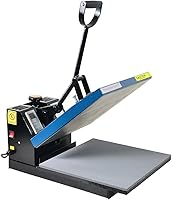
Choose the Delclynee when oversized artwork makes platen size the deciding factor. Its 16 x 24 in heating surface provides space the HTVRONT models can't offer.
Delclynee 16x24 Slide-Out Clamshell

- 16 x 24 in platen
- Slide-out lower platen extends 12.25 in
- Adjustable pressure knob
- Auto-leveling heat platen
Choose the larger Delclynee when transfer dimensions rule out a smaller press. Its threadable lower platen helps you position one garment layer under the heating surface.
Pros
- Larger pressing area for oversized designs
- Slide-out and threadable lower platen
- Adjustable pressure knob
Cons
- Needs room for the larger platen and drawer travel
- 41 lb weight makes frequent moves less convenient
The lower platen slides out 12.25 in, and clearance underneath allows shirt threading. That layout helps you place a single garment layer in the pressing area instead of keeping both sides stacked together.
Pressure is set with a knob, and Delclynee says the floating top platen helps balance pressure across uneven or thicker materials. A fitted cover protects the lower silicone pad and helps hold it in place during loading.
Plan room for the drawer's full travel and for opening the clamshell. At 41 lb, this is a machine to place on a suitable work surface rather than move between projects.
Its audible timer signals the end of the cycle; don't assume it provides the HTVRONT models' automatic release. Choose it for its work area and garment handling, with a workflow suited to a clamshell press.
Skip this larger option if your designs already fit a smaller platen and automatic operation is your priority. Our Fancierstudio heat press review offers another comparison for readers considering a conventional press layout.
What mistakes should you avoid, and how should you care for it?
Keep the pressing area flat, follow the transfer instructions and clean the press only as its manual allows. Most useful habits prevent a setup error from becoming a whole batch of errors.
Don't use maximum heat or pressure as a shortcut for uncertain settings. If a transfer lifts, check the full process, including peel timing and fabric compatibility, before increasing either setting.
Keep thick seams and hardware outside the design area where possible. If a pressing pad or pillow is needed, follow guidance for the transfer and machine because added material changes the working thickness.
Protect the platen and lower pad from adhesive, ink and debris using the protection required for your process. Don't add extra sheets without checking instructions, since layers can change how heat reaches the transfer.
Turn the machine off, unplug it and let it cool before routine cleaning. Use the approved cleaning method and avoid scraping the heating surface or applying cleaners that the manual doesn't permit.
Before a batch, check that the pad is clean and properly seated. Keep a sample and its settings with your job notes so a later run starts from a known process.
Should you buy the HTVRONT Auto Heat Press 2?
Buy the HTVRONT Auto Heat Press 2 when pressure control or bulky garments create a real need in your workflow. Its 8.6 score reflects that fit, with fixed platen size remaining the main reason to choose something else.
Pick the earlier white automatic model for routine flat projects and automatic thickness adjustment. Consider the pink model for similar work when its repeat modes and longer stated warranty better match your priorities.
Choose the Delclynee if your designs need a larger pressing surface and you can accommodate its clamshell workflow. Measure one real project before ordering, rather than choosing around a project you might never make.
For a wider shortlist, compare our best auto heat presses. If you're still deciding between machine types, start with the heat press machine guide.
Frequently asked questions
What is different about the HTVRONT Auto Heat Press 2?
The HTVRONT Auto Heat Press 2 adds user-adjustable pressure up to 170 lb and clearance for items up to 1.77 in high, while retaining automatic pressing and release. Compared with the earlier automatic model, those changes matter most for bulky garments and transfers that call for closer pressure control.
Can the HTVRONT Auto Heat Press 2 press DTF transfers?
Yes, HTVRONT identifies DTF projects as a use for the Auto Heat Press 2's adjustable pressure. Match the garment, temperature, time, pressure and peel method to the transfer supplier's instructions, then check a sample before a batch; the highest pressure setting is not a default for every transfer.
How much space does the HTVRONT Auto Heat Press 2 need?
The machine measures 20.9 in long, 17.1 in wide and 13 in high, but its working space must also allow for loading and garment handling. Use a stable surface that supports its weight, leave the clearances required by HTVRONT's manual, and keep fabric away from hot parts.
Is the HTVRONT Auto Heat Press 2 better than the earlier model?
Choose the Auto Heat Press 2 if you need control over pressure or extra clearance for bulky projects. The earlier model remains a sensible choice for routine flat work with automatic thickness adjustment, so an upgrade makes more sense when your current press limits your actual materials or workflow.