6 Best Heat Presses for Sublimation (October 2026)
The best sublimation heat presses include the Fancierstudio Digital Heat Press 15x15 for frequent shirt projects, the HTVRONT 15x15 Heat Press for repeated shirt batches, and the Fancierstudio FS15x15A Sublimation Press for easier garment loading.
On this page (11 sections)
- Which heat presses work best for sublimation projects?
- Best heat press for sublimation shirts
- Best automatic heat press for sublimation
- Best slide-out sublimation press
- Best 5-in-1 heat presses for sublimation
- How do you choose a sublimation heat press?
- Which blanks and supplies do you need for sublimation?
- How should you set up and run your first sublimation project?
- Which sublimation mistakes waste the most blanks?
- How do you care for a sublimation heat press?
- Which best heat press for sublimation fits your work?
The Fancierstudio Digital Heat Press 15x15 is the best heat press for sublimation for most shirt projects because it pairs a roomy flat platen with adjustable pressure. Choose HTVRONT for automatic operation, or a combo machine when shaped blanks are a regular part of your work.
Start with the products you want to make, rather than the number of attachments in the box. A shirt-focused buyer needs space for the whole design, while a drinkware maker needs the right fit around the blank.
For more apparel options, see our best heat presses for T-shirts and the t-shirt press category guide. Our broader heat press machine guide explains how flat and specialty presses fit different jobs.
Our picks at a glance
-
1
 Best for frequent shirt projects
Fancierstudio Digital Heat Press 15x15
8.0/10 our score
See it on Amazon -
2

-
3
 Best for easier garment loading
Fancierstudio FS15x15A Sublimation Press
7.4/10 our score
See it on Amazon
Which heat presses work best for sublimation projects?
A dedicated flat press is the strongest starting point for shirts, while a combo earns its space when you regularly use its extra attachments. Automatic operation matters most when the same pressing steps repeat throughout a batch.
These picks compare usable area, loading access, controls and attachment fit. Scores reflect those features and their usefulness for sublimation projects.
A high maximum temperature isn't a reason to choose one press over another if both meet your blank's needs. Likewise, an attachment adds little value if its shape doesn't match the items you plan to decorate.
Use the heat press temperature and time guide to understand how settings work together. Your exact blank instructions should decide the cycle.
| Product | Best for | Press area | Controls | Opening style | Our score |
|---|---|---|---|---|---|
| Fancierstudio Digital Heat Press 15x15 | frequent shirt projects | 15 x 15 in | Electronic time and heat | Upward opening | 8.0 |
| HTVRONT 15x15 Heat Press | repeated shirt batches | 15 x 15 in | Automatic pressure, fast modes and custom modes | Automatic release with drawer loading | 7.9 |
| Fancierstudio FS15x15A Sublimation Press | easier garment loading | 15 x 15 in | Electronic time and heat with adjustable pressure | Clamshell with slide-out access | 7.4 |
| Hitgrand 5-in-1 12x15 Press | shirts and tumblers | 12 x 15 in | Digital time and temperature with pressure knob | Swing-away with slide-out platform | 7.3 |
| Horgelu 5-in-1 12x15 Press | mixed gift batches | 12 x 15 in | Digital time and temperature with counter and modes | Swing-away with slide table | 7.1 |
| AKEYDIY 5-in-1 12x15 Press | occasional mixed crafts | 12 x 15 in | Digital time and temperature | Swing-away | 7.0 |
Best heat press for sublimation shirts
The Fancierstudio Digital Heat Press 15x15 is the clearest choice here for buyers focused on flat shirt transfers. Its manual controls suit a workflow where you set the pressure and open the press yourself.
Fancierstudio Digital Heat Press 15x15
- 15 x 15 in press area
- Electronic time and heat control
- Adjustable pressure
- Teflon-coated heat platen
A dedicated flat press for buyers whose regular work is shirts, bags and other flat blanks. Manual pressure adjustment lets you adapt the closing pressure to the project.
Pros
- Room for many adult shirt designs
- Manual pressure adjustment
- Direct time and temperature controls
Cons
- No shaped-item attachments included
- Needs clearance above the open platen
The 15 x 15 in platen gives many adult shirt designs room to fit in one placement. That matters for sublimation because shifting the transfer for a second press can create a faint duplicate edge or uneven color.
Electronic time and heat controls handle the cycle settings, while adjustable pressure lets you account for the blank and protective paper. Set pressure according to the material instructions rather than assuming a harder squeeze produces a better image.
The upward-opening design suits a table where side clearance is limited, but the upper platen still needs clear space above it. Place the machine where you can raise the handle fully without reaching beneath a shelf.
Buy this model if shirts, bags and other compatible flat blanks make up most of your work. Skip it if drinkware is your main goal or you want the machine to release each project automatically.
Its coated heat platen still needs protection from stray sublimation ink. Use clean protective paper as directed for the blank, and keep printed paper from touching exposed press surfaces.
Best automatic heat press for sublimation
The HTVRONT 15x15 Heat Press suits repeated shirt batches where automatic pressing and release reduce manual steps. Choose it when its automatic pressure approach fits your materials.
HTVRONT 15x15 Heat Press
- 15 x 15 in press area
- Automatic press and release
- Items up to 1 in thick
- Auto-off after 15 minutes without operation
Automatic closing and release reduce the manual steps in repeated shirt jobs. Choose it when automatic pressure suits your blanks and their required temperature stays within its capability.
Pros
- Automatic pressing and release
- Drawer-style loading plate
- Custom modes for repeated settings
Cons
- Pressure is set automatically
- 410°F upper temperature limit
HTVRONT says the machine detects item thickness, sets pressure for blanks up to 1 in thick, and releases them after pressing. This removes the repeated handle movement, though you still need to load, align and remove each project.
Its drawer-style placement plate brings the loading area forward. Keep the drawer path clear and leave a nearby surface for cooling items so finished work doesn't block the next blank.
There are 4 fast modes, 2 custom modes and an automatic mode. Custom settings are useful for repeated blanks, provided you keep different materials clearly separated and check the selected cycle before starting.
The upper temperature limit is 410°F, so confirm your intended process fits that ceiling. The 15-minute idle shutoff is a backup feature, while switching off after the session remains part of the routine.
Skip this model if your work requires direct manual pressure adjustment or higher temperatures. Automatic release also doesn't make the work area safe to leave unattended, since the platen and finished blanks remain hot.
Best slide-out sublimation press
The Fancierstudio FS15x15A Sublimation Press suits buyers who want manual pressure control with better access to the loading area. Choose it over the first Fancierstudio when pulling the work forward solves a real workspace problem.
Fancierstudio FS15x15A Sublimation Press
- 15 x 15 in press area
- Work area slides out 5.5 in
- Adjustable pressure
- Electronic time and heat controls
The pull-forward work area gives you more access for placing shirts and transfers. It suits buyers who want manual pressure control without choosing a combo machine.
Pros
- Pull-forward loading access
- Room for many shirt designs
- Manual pressure adjustment
Cons
- Needs clear space in front
- No mug or hat attachments included
The work area slides out 5.5 in when open, bringing more of the garment within reach. That can make it easier to position a transfer without leaning as far beneath the upper platen.
Its electronic controls set time and temperature, and the temperature range reaches 500°F. Use the setting required by the blank, since extra heat can damage fabric or spoil a coated surface.
The slide doesn't remove the need to flatten the garment before closing. Keep collars, thick hems and other raised details away from the image area so they don't lift the platen off part of the transfer.
Buy it for flat projects when loading access matters more than automatic release. Skip it if your table is too shallow to support a comfortable pull-forward workflow or if you mostly decorate curved items.
Allow space in front for both the extended platform and your hands. A press that fits on the table when closed can still be awkward to use when its loading path overlaps your supply area.
Best 5-in-1 heat presses for sublimation
A combo press makes sense for a planned mix of shirts and shaped blanks. Choose among these models by attachment fit and workflow, rather than treating all 5-in-1 machines as interchangeable.
Hitgrand 5-in-1 12x15 Press

- 12 x 15 in shirt press
- Tumbler attachment fits compatible straight mugs
- Swing-away upper platen
- Slide-out lower platform
A combo for crafters who plan to make shirts and compatible straight drinkware. Hat and plate attachments add options, but the shirt area is smaller than the dedicated flat picks.
Pros
- Includes tumbler, hat and plate attachments
- Manual pressure adjustment
- Two ways to move hot parts away from loading
Cons
- Less shirt space than the flat picks
- Drinkware must match attachment dimensions
The Hitgrand 5-in-1 12x15 Press is the most direct fit here for buyers who want shirts and compatible straight tumblers. Its drinkware attachment also handles compatible straight mugs.
The attachment has a 10.6 in heating length and fits diameters from 2.65 to 3.4 in. Measure the blank's printable section, since capacity alone doesn't establish fit and a tapered wall may not contact a straight heater evenly.
A swing-away upper platen and slide-out lower platform give you two ways to clear the shirt loading area. Plan space beside the machine as well as in front, including a place where the hot upper platen can sit unobstructed.
The pressure knob lets you adjust for the material stack, and the controls cover 30–450°F. Its shirt platen is smaller than the dedicated flat picks, so check wider designs before choosing the combo route.
Buy Hitgrand when its drinkware dimensions match blanks you already plan to use. Skip it for shirt-only work or when your preferred drinkware needs a different heater shape.
Horgelu 5-in-1 12x15 Press

- 12 x 15 in shirt press
- Counting function
- Preset time and temperature modes
- Mug, cap and plate attachments
A counter and stored settings help organize repeated runs of gifts. Its mug, cap and plate attachments suit a mixed project plan rather than shirt work alone.
Pros
- Counter for tracking cycles
- Modes reduce repeated setting changes
- Slide table and swing-away access
Cons
- Smaller shirt platen than the flat picks
- Attachment changes interrupt the workflow
The Horgelu 5-in-1 12x15 Press suits mixed gift runs where a counter and saved settings help organize repeated work. It pairs the flat platen with cap, mug and plate attachments.
The counter is useful for tracking cycles, but keep a separate record of completed pieces. A cycle count doesn't distinguish a finished item from a practice piece or a project that needs replacing.
Preset modes reduce repeated entry of time and temperature. Label your job notes by blank type so you don't carry a mug setting into a shirt run or assume two coatings need the same cycle.
The upper platen swings aside and the lower table slides out. Use that access to align the blank carefully, while keeping loose sleeves and cords away from hot surfaces.
Choose Horgelu if you expect batches across several blank shapes. Skip it if nearly all your work is apparel, because the extra attachments add changeover steps without increasing shirt capacity.
Horgelu instructs users to switch the power off before changing attachments. Let parts cool and follow the connection instructions rather than treating attachment swaps as a quick step between hot cycles.
AKEYDIY 5-in-1 12x15 Press
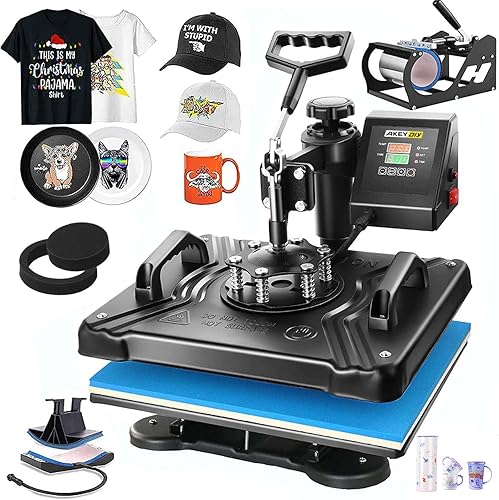
- 12 x 15 in shirt press
- Mug and cap attachments
- 6 and 8 in plate attachments
- Swing-away upper platen
A mixed-craft option for shirts, caps, mugs and plates when a larger shirt platen is unnecessary. Resolve its conflicting mug sizes and warranty terms before committing.
Pros
- Several attachment types included
- Digital cycle controls
- Upper platen moves aside for loading
Cons
- Conflicting mug attachment sizes and warranty terms
- Needs side clearance and attachment storage
The AKEYDIY 5-in-1 12x15 Press fits occasional mixed crafts where shirts, caps, mugs and plates all have a place. Its plate attachments are 6 and 8 in across.
Attachment size still needs to match the blank's intended decorated area. A plate's outer diameter doesn't prove that its center shape or coating will work with a particular heater.
The digital controller sets time and temperature, while the upper platen swings to the side for loading. Keep the swing path clear of stored blanks, attachment cables and anything that could be damaged by heat.
AKEYDIY gives conflicting mug attachment sizes and warranty terms, so confirm both before buying. That check matters most if one specific mug size is the reason you're choosing this machine.
Choose it when the confirmed attachments match a varied craft plan and a smaller shirt area is enough. Skip it if the unresolved details affect your main project or if regular shirt work calls for more platen room.
Store cooled attachments together with their connection instructions so occasional use doesn't turn each changeover into a search for parts.
How do you choose a sublimation heat press?
Choose a press around your largest regular design and your most common blank, then check settings, pressure and workspace. That order keeps occasional projects from driving the whole decision.
What platen size suits the best sublimation heat press?
Your complete design should fit inside the usable heated area in one placement. Measure the transfer itself rather than choosing a machine from the garment's labeled size.
A small logo on a large shirt can need less area than a wide print on a smaller shirt. Leave enough room to position the transfer without placing its edges at the platen's limit.
Avoid planning around repeated overlapping presses for one sublimation image. Reheating one area while moving another can cause color changes, transfer movement and visible boundaries.
Our guide to choosing a heat press size explains how to compare dimensions with your usual projects.
Should you choose automatic or manual pressure?
Choose manual pressure control when you want to adjust the closure yourself for different material stacks. Choose automatic pressure when reducing repeated adjustments matters more and the machine supports your blanks.
More pressure isn't always better for sublimation. Excess force can leave impressions in fabric or damage a blank, while poor contact can leave parts of the image pale.
Seams and zippers can create uneven contact even when the pressure setting seems right. Position raised details outside the pressing area where possible, and use only pads or supports suited to the process.
When is a combo worth the extra attachments?
A combo is worthwhile when several included shapes appear in your actual project plan. Write down the first few items you expect to make and match each one to an attachment.
Allow for cooling, changing parts and resetting controls between blank types. Grouping similar items into one run reduces those interruptions.
If you mainly make drinkware, a dedicated machine may be a more direct purchase. If you're still learning basic garment work, our best heat presses for beginners offers a simpler starting comparison.
Which temperature and power details matter?
The press must meet the blank's required temperature and electrical needs. Maximum temperature alone doesn't establish heating consistency, recovery speed or suitability for a particular coating.
Don't confuse a silicone mat's heat resistance with the press's operating range. Likewise, wattage alone isn't a reliable ranking of finished transfer quality.
Check the machine label and manual for the required outlet and circuit capacity. Plan around the press's load, especially if other high-power tools share the workspace.
Which blanks and supplies do you need for sublimation?
You need sublimation-compatible blanks and a matching ink-and-paper process, not just a heat press. Ordinary heat-transfer vinyl and sublimation use different materials and preparation steps.
For fabric, sublimation works best with suitable polyester content, and light backgrounds let the image colors show clearly. Sublimation ink doesn't add an opaque white layer, so a dark shirt won't behave like a white blank.
For mugs, tiles and similar hard goods, choose blanks with a coating intended for sublimation. A plain ceramic mug doesn't become suitable because it fits the attachment.
Gather heat-resistant tape, the recommended protective paper and a clean cooling surface before starting. Use protective supplies rated for the required temperature, and follow the blank instructions for any special wrap or support.
How should you set up and run your first sublimation project?
Set up a stable, clear work area and run one practice blank before committing a batch. Use that first result to settle the process for that exact material.
Set up the table and loading path
Place the press on a sturdy surface that supports its weight and operating movement. Check clearance with the platen open, the drawer extended or the upper heater swung aside.
Keep a separate cool area for paper alignment and a heat-safe area for finished blanks. Follow the press and material instructions for ventilation and keep children and pets away from the work zone.
Prepare the blank and transfer
Check image size and orientation before printing, including whether the design needs mirroring. Clean the blank as directed, since lint, dust and fingerprints can affect the finished image.
For fabric, remove lint and pre-press only as the material instructions advise. Secure the transfer so it won't slide as you load the press or lift the platen.
Press and remove without shifting
Set the temperature, time and pressure for the exact blank, then allow the press to reach the required conditions. Check that the whole image lies flat before closing.
Remove the paper at the stage specified for that material, keeping it from dragging across the surface. Handle hot blanks with suitable protection and place them where they can cool undisturbed.
Record the blank, settings, protective layers and result. A short job note makes the next batch easier than relying on memory or an unlabeled preset.
Which sublimation mistakes waste the most blanks?
The most avoidable failures come from wrong materials, moving paper and uneven contact. Check those causes before increasing heat or extending every cycle.
Using one setting for every material
A shirt, coaster and mug can require different conditions even when they use the same ink. Follow each blank's instructions rather than borrowing a familiar cycle from another project.
If a practice result needs adjustment, change one factor at a time. Changing heat, time and pressure together makes it harder to identify what helped.
Moving the transfer while it is hot
Paper movement can create ghosting, which looks like a pale second outline. Secure the transfer appropriately and lift or remove it without sliding across the design.
Keep freshly pressed items clear of loose printed sheets. Residual heat can transfer ink where you don't want it.
Reusing ink-marked protective paper
Stray ink on protective paper can mark the next blank. Replace stained sheets and use protection above or inside a garment as directed to prevent ink reaching the platen or back layer.
A nonstick platen coating doesn't replace this step. Its purpose doesn't include absorbing loose sublimation ink.
Ignoring moisture or raised details
Moisture and surface debris can interfere with a clean result. Prepare the blank according to its instructions rather than automatically adding a long pre-press.
Pale patches near seams may indicate poor contact instead of insufficient temperature. Inspect how the blank sits before turning up the heat.
How do you care for a sublimation heat press?
Keep pressing surfaces clean and attachments secure, and inspect the machine before each session. Small deposits or damaged pads can affect how the next blank sits.
Switch off, unplug and let the press cool before cleaning or changing parts as directed. Use the cleaning method in the manual rather than scraping a coated platen with a metal tool.
Check pads and covers for damage, trapped debris or uneven areas. Don't keep compensating with pressure if a worn support surface is causing uneven contact.
Store cooled attachments where their cables won't be crushed or pulled. Keep the surrounding area clear so a swing arm or drawer doesn't catch stored supplies during use.
Which best heat press for sublimation fits your work?
Pick the Fancierstudio Digital Heat Press 15x15 when shirts and flat blanks are your main work. Choose the FS15x15A if pull-forward loading is worth giving up space in front of the machine.
The HTVRONT is the best heat press for sublimation buyers who prioritize automatic pressing and release. Confirm that its pressure approach and temperature ceiling suit the blanks you intend to use.
Choose Hitgrand for compatible straight tumblers alongside shirts, Horgelu for mixed runs where modes and a counter help, or AKEYDIY for occasional varied crafts after resolving attachment details.
Before ordering, measure one representative design and confirm one blank's required cycle. Then follow our guide to using a heat press to prepare a repeatable workflow.
Our top 3 picks at a glance
-
1
Best for frequent shirt projects
Fancierstudio Digital Heat Press 15x15
8.0/10 our score
See it on Amazon -
2
-
3
Best for easier garment loading
Fancierstudio FS15x15A Sublimation Press
7.4/10 our score
See it on Amazon
Frequently asked questions
What kind of heat press works for sublimation?
A flat heat press with suitable time, temperature and pressure controls works for polyester shirts and compatible flat blanks. Match its usable press area to your whole design and follow the blank supplier's instructions.
Mugs and other curved items need an attachment shaped to fit them, plus a sublimation-ready surface.
Is a 15 x 15 in heat press large enough for shirts?
A 15 x 15 in platen fits many adult shirt designs, but measure your largest regular transfer before choosing. The complete image should fit within the usable heated area in one placement.
Seams, collars and zippers also matter because they can keep the fabric beneath the design from lying flat.
Do I need a 5-in-1 heat press for sublimation?
No, a flat press is enough when your projects are suitable shirts and other flat blanks. A combo becomes useful when mugs, caps or plates are part of your regular work.
Choose it for attachments you expect to use, and allow room for storing them and changing between jobs.
Can I use any heat press for sublimation?
Use a press that reaches your blank's required temperature, holds the complete transfer flat and applies suitable pressure. A heat press cannot make an unsuitable blank accept sublimation ink.
Start with compatible polyester fabric or a purpose-coated blank, then check its instructions against the press's controls and attachment shape.
What should I check before buying a sublimation press?
Check your largest design, blank shape, required settings, pressure control and available workspace before buying. Include room for the opening arm or drawer, and confirm the electrical requirements.
Our heat press size guide explains how to match platen dimensions to your projects without buying around shirt size alone.



