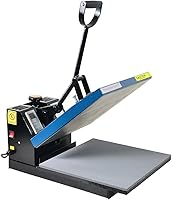
5 Best Auto Heat Presses (October 2026)
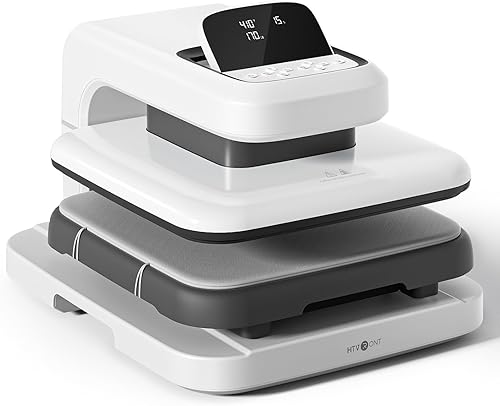
The best automatic heat presses include the HTVRONT Auto Heat Press 2 15x15 for mixed apparel projects, the HTVRONT Auto Heat Press 15x15 for repeat shirt batches, and the HTVRONT Auto Tumbler Press for drinkware makers.
On this page (8 sections)
- How we chose these automatic heat presses
- Compare the best automatic heat presses
- Best auto heat presses for shirts and specialty projects
- How do you choose the best auto heat press?
- How should you set up and use an automatic heat press?
- Which mistakes can spoil an automatic heat press project?
- How do you care for an auto heat press?
- Which best auto heat press fits your next projects?
The best auto heat press for most shirt projects is the HTVRONT Auto Heat Press 2 15x15 because it combines adjustable pressure with clearance for thicker apparel. Choose a dedicated tumbler or hat press if curved blanks make up most of your work.
Automation handles the pressing cycle, but your results still depend on blank compatibility, transfer placement and the right settings. A machine that closes itself cannot correct a fold under a shirt or make an unsuitable cup ready for sublimation.
If you mainly decorate apparel, compare these picks with our best heat presses for T-shirts. Our guide to clamshell, swing-away and auto heat presses explains how each format changes loading and workspace needs.
Our picks at a glance
-
1
-
2

-
3

How we chose these automatic heat presses
We compared project fit, pressure controls, loading design and saved settings to identify useful choices for different buyers. The scores reflect those features and their value for the intended work.
For a general apparel press, pressure adjustment and room to position garments matter more than a long list of modes. For hats and drinkware, the first requirement is a heating shape that fits the blank.
These machines serve different jobs, so the overall order should not override your project needs. A dedicated cap press is the better buy for cap orders even though a flat apparel model ranks higher overall.
Compare the best automatic heat presses
Choose between the flat models for apparel, and use the dedicated machines for curved projects. Pressure adjustment separates the two newer flat presses from the original HTVRONT, while the Cricut also adds optional mobile guidance.
| Product | Best for | Press area | Pressure | Max item height | Our score |
|---|---|---|---|---|---|
| HTVRONT Auto Heat Press 2 15x15 | mixed apparel projects | 15 x 15 in | Adjustable up to 170 lb | 1.77 in | 8.6 |
| HTVRONT Auto Heat Press 15x15 | repeat shirt batches | 15 x 15 in | 8.3 | ||
| HTVRONT Auto Tumbler Press | drinkware makers | 8.2 | |||
| HTVRONT Auto Hat Press | cap customization | 7.9 | |||
| Cricut AutoPress 2 15x15 | guided craft projects | 15 x 15 in | Adjustable up to 220 lb | 7.2 |
Compare maximum pressure with care: a higher limit does not mean every transfer should use more force. The useful feature is being able to meet your material's instructions without crushing texture or pressing across raised seams.
Best auto heat presses for shirts and specialty projects
The HTVRONT Auto Heat Press 2 is the first choice for mixed apparel work. The other picks make sense when repeat settings, curved blanks or guided controls are more important to your routine.
HTVRONT Auto Heat Press 2 15x15
- 15 x 15 in pressing area
- Adjustable pressure up to 170 lb
- Fits items up to 1.77 in thick
- Auto release and 15-minute auto-off
Choose this model for shirts and thicker apparel when you need to set the pressing force. Automatic pressing and release handle the cycle after you position the project.
Pros
- User-adjustable pressure
- Clearance for thicker apparel
- Screen angle adjusts for easier viewing
Cons
- Needs a sturdy bench and loading space
- Flat format does not wrap curved blanks
Choose the HTVRONT Auto Heat Press 2 for a mix of shirts, hoodies and other flat projects that need different pressure settings. Its user-adjustable force gives you a direct control to change when moving between transfer types.
That matters for DTF work, where pressure is part of the transfer instructions rather than something to leave to guesswork. Extra item clearance also gives thicker apparel more room, although a bulky seam still needs to stay outside the design area.
HTVRONT says the press reaches 410°F in 5 minutes and 30 seconds. Its screen tilts through 7 positions, which helps you read the controls from your normal working position.
Skip it if your work centers on curved objects or designs too large for the plate. For apparel, the strongest reason to choose it is control over varied projects, rather than a need to use its highest settings.
Read our HTVRONT Auto Heat Press 2 review for a closer look at its fit.
HTVRONT Auto Heat Press 15x15
- 15 x 15 in pressing area
- Auto-adjusts to items up to 1 in thick
- Four fast modes and two custom modes
- Auto release and 15-minute auto-off
Preset and custom modes suit repeated shirt projects with familiar materials. The sliding board gives you a separate loading area before the automatic cycle begins.
Pros
- Saved settings for repeat jobs
- Automatic thickness adjustment
- Sliding board for loading
Cons
- Less clearance than the newer flat models
- HTVRONT specifies a 30-day warranty
Choose the original HTVRONT Auto Heat Press for repeat shirt projects with familiar materials. Its 4 fast modes, 2 custom modes and auto mode suit a routine where you return to the same settings.
You load the sliding board, move it inside and press R to begin. The machine adjusts for project thickness and releases when the timer ends, reducing the repeated work of operating a manual handle.
The key buying distinction is thickness adjustment versus user-selected pressure. Automatic adjustment for a blank's height is useful, but buyers who need to choose pressing force should favor one of the adjustable-pressure flat models.
Skip this press if bulky projects are common or pressure control is central to your transfer choices. Its lower clearance also makes measuring the full project stack worthwhile before you buy.
For shirt work, check design dimensions as well as garment size. Our guide to what size heat press you need explains that choice.
HTVRONT Auto Tumbler Press
- Fits drinkware 2.9–3.2 in in diameter
- Accommodates 10–30 oz sizes
- Automatic pressure adjustment
- Emergency stop and 15-minute auto-off
Choose this dedicated press for compatible sublimation drinkware. Measure the vessel's diameter rather than relying on its ounce capacity alone.
Pros
- Pressure adjusts to vessel diameter
- Emergency stop releases the heat pad
- Dedicated curved heating format
Cons
- Does not press flat apparel
- Vessels must fit the supported diameter
Choose the HTVRONT Auto Tumbler Press if sublimation drinkware is your main project. Its curved heating format serves a job that the flat presses in this roundup cannot replace.
Supported vessels measure 2.9–3.2 in in diameter, with a stated capacity range of 10–30 oz. Measure the actual pressing area of your blank, since ounce capacity alone does not tell you its width or shape.
The machine adjusts pressure to vessel diameter and reaches up to 390°F. Its emergency stop halts heating and releases the heat pad, but the pad and vessel remain hot afterward.
Skip it for apparel, unsupported vessel shapes or blanks that require temperatures beyond its range. A cup fitting inside the machine does not establish that its coating can accept sublimation ink.
Before making a batch, prepare one suitable blank and check placement, color transfer and wrap coverage. Our tumbler heat pressing guide covers preparation and the pressing sequence.
HTVRONT Auto Hat Press

- Automatic lowering and lifting
- Two interchangeable hat platens
- Pressure over 176 lb
- Two customizable preset modes
Two interchangeable supports suit adult hats and smaller caps. Choose it for recurring cap work where a curved platen matters more than a large flat pressing area.
Pros
- Supports two cap sizes
- Automatic lowering and lifting
- Saved settings for different materials
Cons
- Specialized for hats
- Cap shape and seams still affect placement
Choose the HTVRONT Auto Hat Press for recurring cap customization, especially if you work with both adult hats and smaller caps. Its two interchangeable platens support those different sizes without trying to flatten the cap onto an apparel press.
The machine lowers and lifts automatically, and two custom presets let you save settings for repeat materials. HTVRONT specifies pressure over 176 lb and supports projects using DTF film, embroidery patches, puff vinyl and sublimation paper.
Those options still need suitable caps and material-specific instructions. A thick patch, a center seam and a structured cap front create different placement needs, even when the press handles the cycle.
Skip it if caps are only a passing idea and your current work is mostly shirts. A dedicated shape is useful when you have a regular job for it, but it does not provide a broad flat area for other projects.
Use our guide to how to heat press a hat to plan support and design placement.
Cricut AutoPress 2 15x15

- 15 x 15 in heat plate
- Adjustable pressure up to 220 lb
- Four customizable presets
- Bluetooth control and interactive Heat Guide
Cricut combines adjustable pressing controls with optional mobile settings and project guidance. It suits buyers who want instructions built into their craft workflow.
Pros
- User-adjustable pressure
- Interactive Heat Guide
- Control Pod and optional mobile connection
Cons
- Integrated mobile features require a compatible device, app and internet
- Compatible materials and accessories sold separately
Choose the Cricut AutoPress 2 if guided settings are part of what you want to buy. It combines adjustable pressure with an interactive Heat Guide and optional Bluetooth transfer of settings from a mobile device.
The Control Pod handles 4 customizable presets. The integrated mobile experience requires a compatible Bluetooth device, high-speed internet and the Cricut Design Space mobile app, so decide whether that setup fits how you prefer to work.
Cricut supports compatible DTF, HTV including puff materials, Infusible Ink and sublimation projects. The full-slide tray provides a loading area, while Auto Mode handles the pressing cycle.
Skip it if you want a simple control-panel routine and would rarely use the guidance. Choose it when those instructions and saved workflows have a clear role in your projects, rather than choosing by maximum pressure alone.
Our comparison of HTVRONT Auto Heat Press 2 and Cricut AutoPress 2 helps you weigh those two approaches.
How do you choose the best auto heat press?
Choose project shape first, design size second and pressure control third. Then check whether the machine fits your workbench and supports a pressing routine you can repeat.
Match the automatic heat press to your blanks
Flat presses suit shirts, totes and suitable flat decor blanks. Hat and tumbler presses use shaped supports or heating areas to make contact with curved surfaces.
Write down the projects you already make, rather than every project you might try someday. If most are shirts, start with an apparel press and add a specialized machine when cap or drinkware work becomes regular.
For sublimation, confirm that the blank itself is suitable. Polyester content or a suitable coating matters, and a capable press cannot make an ordinary cotton shirt or uncoated cup behave like a sublimation blank.
Measure the design and the full project stack
A design should fit within the usable pressing area without needing a second position. One complete press is simpler to control than overlapping sections, which can expose part of the transfer to extra heat.
Measure your largest routine artwork, including any backing or placement needs. A larger shirt does not always need a larger plate, but a wide design may.
Item clearance is a separate measurement from plate size. Include the garment, support accessories and any other layers that the machine's instructions allow, rather than measuring the fabric alone.
Separate pressure control from thickness adjustment
Choose user-adjustable pressure when you need to change force for different transfer types. Thickness adjustment helps the mechanism accommodate a blank, but it is not the same control.
A maximum force figure also differs from pressure at the transfer surface. Contact area, seams and the way a blank sits can change how force reaches the design.
Do not choose the highest setting by default. Follow the transfer instructions, particularly for puff materials, textured fabric and raised decorations that can lose shape under excess force.
Choose presets around actual repeat jobs
Saved settings help most when you return to the same transfer and blank combination. A preset labeled for a broad material type is only a starting point if it differs from your supplier's instructions.
Keep a short job record with temperature, time, pressure setting, peel timing and any finishing press. Name saved modes after the actual material combination so similar-looking transfers do not get mixed up.
Check the full workspace, not just machine dimensions
Allow room for the tray or board to move, your hands to load the project and fabric to hang without pulling. Also reserve a clear surface for hot blanks and a separate place for unused transfers.
For the top pick, the machine itself measures 20.9 x 17.1 x 13 in and weighs 21.54 kg. It needs a stable bench that can support it without wobbling during loading.
Check the model's electrical requirements and follow its connection instructions. Avoid placing cords where a moving tray, hanging garment or hot blank could catch them.
How should you set up and use an automatic heat press?
Set up a stable, clear work area, then follow the instructions for the press, transfer and blank. Automation starts after preparation, so loading deserves as much attention as the cycle settings.
Prepare the blank before positioning the transfer
Check the fabric label or blank supplier's guidance for heat compatibility. Remove lint and loose debris that could affect the finished design, especially on light sublimation blanks.
Smooth the pressing area and move seams, pockets, buttons and zippers outside it where possible. Raised features can keep the plate from contacting the transfer evenly.
Pre-press only as directed for your material. Do it before final alignment, since heating can change how the fabric lies.
Set each part of the transfer recipe
Enter temperature, time and pressure from the transfer supplier's instructions. Peel timing is part of the recipe, too: hot, warm and cold peel methods are not interchangeable.
Check whether the instructions call for a cover sheet or finishing press. Different transfer types have different needs, so adding an extra layer or extra cycle without guidance can change the result.
Let the machine reach the selected temperature before starting. Our heat press temperature and time guide explains how to approach settings without treating one recipe as universal.
Make a sample before committing a batch
Use a spare suitable blank or scrap of the same fabric to confirm placement and the pressing process. Inspect edges, color and any unwanted marks after the required cooling and peel steps.
For apparel orders, check the sample through the transfer supplier's care process before repeating the job. A design looking good immediately after peeling is only one part of judging whether the settings suit the material.
Stay nearby throughout the cycle
Automatic release removes the need to open the press manually, but you still need to supervise the work. Keep hands clear of moving parts and keep children, pets and loose objects away from the machine.
Do not treat auto-off as a cooling control. Switch off after use as directed, and leave hot parts clear until they have cooled.
For a fuller workflow, read how to use a heat press before starting your first project.
Which mistakes can spoil an automatic heat press project?
The most common avoidable mistakes are wrong settings, poor contact and an unsuitable blank. Check those causes before adding more heat or pressure.
Assuming a preset fits every transfer
Two transfers can look similar and still need different temperatures or peel methods. Verify the instructions when changing brands, materials or transfer types, even if the garment stays the same.
If a result fails, change one variable at a time on a fresh sample. Increasing time, heat and force together makes it harder to learn which setting caused the problem.
Pressing over seams or folded fabric
A seam can hold part of the plate above the transfer, leaving weak contact nearby. Fabric folded underneath can also change the stack and create marks.
Reload the garment so the target area sits flat. Use support accessories only where the press and transfer instructions allow them, since added layers change the setup.
Moving the transfer during removal
Lifting a sheet too soon or shifting a sublimation wrap while hot can spoil an otherwise careful press. Follow peel and cooling instructions, and keep the design stable during handling.
Set up your cooling area before starting the cycle. Trying to clear space while holding a hot blank invites rushed movement.
Treating capacity as a promise of fit
A tumbler's ounce capacity does not guarantee the right diameter, and a cap's size label does not guarantee good platen contact. Measure the relevant area and check its shape.
For hats, pay attention to panel seams and the curve beneath the design. For drinkware, check for taper or raised features where the heating area needs contact.
Buying automation to solve a sizing problem
An automatic cycle does not expand the pressing area or make a flat plate wrap a vessel. Buy the correct format before comparing convenience features.
If a frequent design needs repositioning, reconsider the plate size. If loading is awkward, check bench layout and garment support before blaming the timer or controls.
How do you care for an auto heat press?
Keep contact surfaces clean, protect moving parts from debris and let the machine cool before routine cleaning. Follow the manufacturer's care instructions for the specific heating surface or coating.
Inspect the platen, pad or heat wrap before a session. Adhesive residue, lint and damaged contact surfaces can affect the next blank, so address them before loading valuable materials.
Use only approved cleaning methods and tools. Avoid scraping coated surfaces with metal or spraying cleaner into controls, joints and electrical parts.
Check cords and moving areas for damage or obstruction. Stop using the press if movement becomes abnormal or an electrical fault appears, and contact the manufacturer for guidance.
Store transfers and blanks away from residual heat and keep the cooled machine clear of clutter. Leave the tray or mechanism in the position the manufacturer recommends for storage.
Which best auto heat press fits your next projects?
Choose the HTVRONT Auto Heat Press 2 when varied apparel and pressure adjustment drive the decision. Choose the original HTVRONT for familiar shirt batches where saved modes and automatic thickness adjustment meet your needs.
Pick the Auto Tumbler Press for compatible drinkware and the Auto Hat Press for regular cap work. Choose the Cricut AutoPress 2 when its Heat Guide and optional mobile settings are features you will use.
Before ordering, confirm your largest design, thickest project stack and available loading space. Those checks narrow the choice more usefully than comparing maximum settings alone.
If your project mix is still unclear, start with heat press machines: types, sizes and top picks. For order-based apparel work, compare the best heat presses for a small business around the blanks and designs you expect to repeat.
Our top 3 picks at a glance
-
1
-
2
-
3
Frequently asked questions
What is an auto heat press?
An auto heat press powers part or all of the pressing cycle, such as closing, applying pressure and releasing when time ends. Features vary by model, so check which actions are automatic.
You still load the blank, position the transfer and choose settings that suit both materials.
Is an automatic heat press good for beginners?
Yes, an automatic heat press can help beginners by handling the pressing cycle and releasing at the end. Saved settings can also reduce repeated setup.
Start with one transfer type and a suitable blank, follow their instructions, and make a sample before decorating gifts or filling orders.
Can I use a shirt heat press for tumblers?
Use a dedicated tumbler press for curved drinkware because a flat shirt press cannot wrap its heating surface around a vessel. Match the machine to the blank's shape and dimensions.
Also confirm that the drinkware has a coating suitable for sublimation and that its required settings fall within the press's range.
What should I check before buying an auto heat press?
Check project shape, design size, pressure control, material clearance and loading space before buying an auto heat press. Those points matter more than the number of presets.
For hats or drinkware, confirm the blank fits the support or heating area, and plan a clear place for hot finished projects.
Can an auto heat press handle DTF transfers?
Yes, the HTVRONT Auto Heat Press 2 and Cricut AutoPress 2 support DTF projects and offer adjustable pressure. Choose settings from your transfer supplier's instructions.
Follow the required peel timing and any finishing press, and keep seams outside the transfer area so they do not interfere with contact.